Control Plane Connector
This feature is available in the Standard Plan and above. For more information, see our pricing plans or contact our sales team.
Control Plane Connector connects arbitrary Kubernetes application clusters outside the Upbound Spaces to your control planes running in Upbound Spaces. This lets you interact with your control plane's API from the app cluster. The claim APIs and the namespaced XR APIs you define via CompositeResourceDefinitions (XRDs) in the control plane, are available in your app cluster alongside Kubernetes workload APIs like Pod. Control Plane Connector enables the same experience as a locally installed Crossplane.
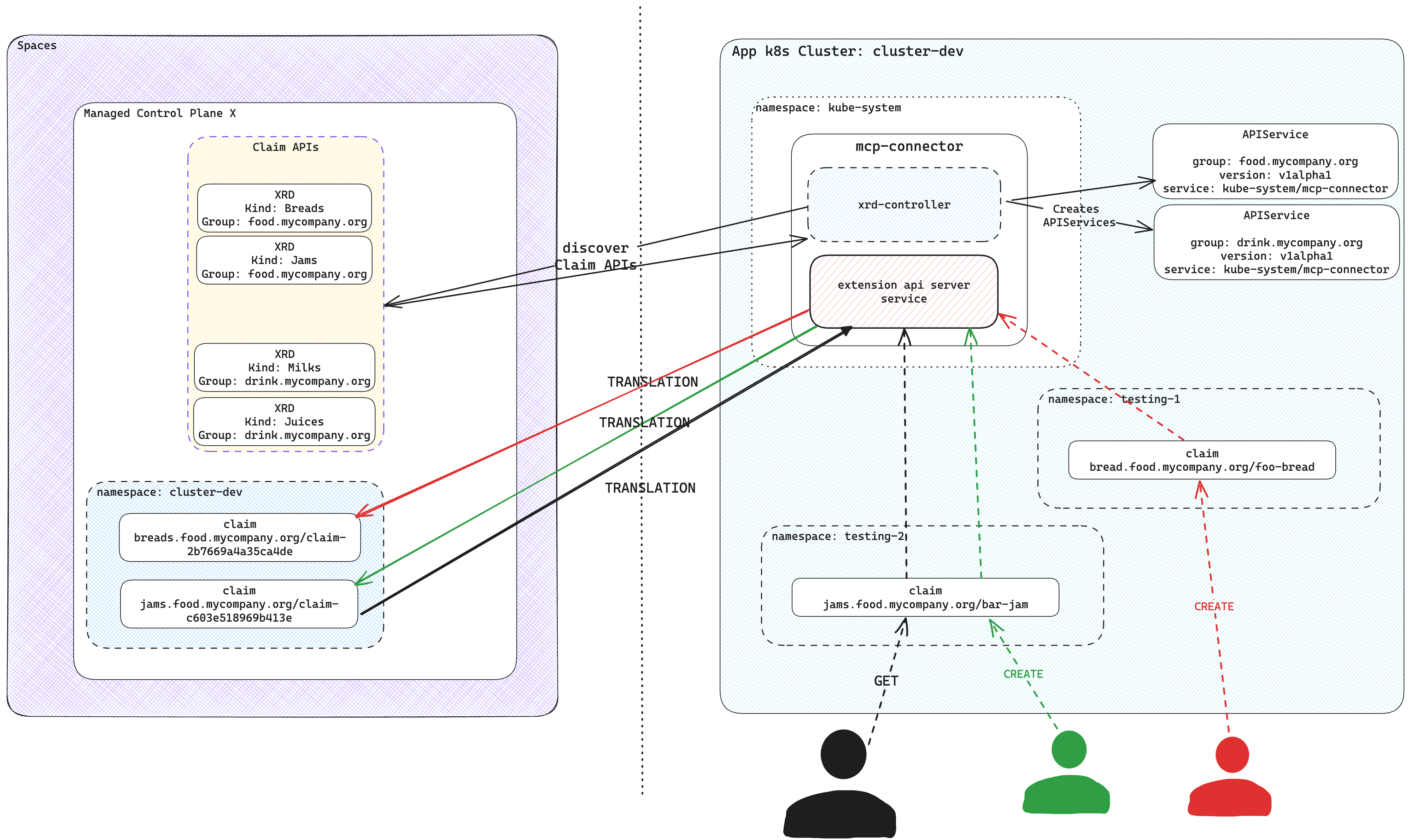
Control Plane Connector operations
Control Plane Connector leverages the Kubernetes API AggregationLayer to create an extension API server and serve the claim APIs and the namespaced XR APIs in the control plane. It discovers the claim APIs and the namespaced XR APIs available in the control plane and registers corresponding APIService resources on the app cluster. Those APIService resources refer to the extension API server of Control Plane Connector.
The claim APIs and the namespaced XR APIs are available in your Kubernetes cluster, just like all native Kubernetes APIs.
The Control Plane Connector processes every request targeting the claim APIs and the namespaced XR APIs and makes the relevant requests to the connected control plane.
Only the connected control plane stores and processes all claims and namespaced XRs created in the app cluster, eliminating any storage use at the application cluster. The control plane connector provisions a target namespace at the control plane for the app cluster and stores all claims and namespaced XRs in this target namespace.
For managing the claims and namespaced XRs, the Control Plane Connector creates a unique identifier for a resource by combining input parameters from claims, including:
metadata.namemetadata.namespaceyour cluster name
It employs SHA-256 hashing to generate a hash value and then extracts the first 16 characters of that hash. This ensures the resulting identifier remains within the 64-character limit in Kubernetes.
For instance, if a claim named my-bucket exists in the test namespace in
cluster-dev, the system calculates the SHA-256 hash from
my-bucket-x-test-x-00000000-0000-0000-0000-000000000000 and takes the first 16
characters. The control plane side then names the claim claim-c603e518969b413e.
For namespaced XRs, the process is similar, only the prefix is different.
The name becomes nxr-c603e518969b413e.
Installation
- up CLI
- Helm
Log in with the up CLI:
up login
Connect your app cluster to a namespace in an Upbound control plane with up controlplane connector install <control-plane-name> <namespace-to-sync-to>. This command creates a user token and installs the Control Plane Connector to your cluster. It's recommended you create a values file called connector-values.yaml and provide the following below. Select the tab according to which environment your control plane is running in.
- Cloud and Connected Spaces
upbound:
  # This is your org account in Upbound e.g. the name displayed after executing `up org list`
  account: <ORG_ACCOUNT>
  # This is a personal access token generated in the Upbound Console
  token: <PERSONAL_ACCESS_TOKEN>

spaces:
  # If your control plane is running in Upbound's GCP Cloud Space, else use upbound-aws-us-east-1.spaces.upbound.io
  host: "upbound-gcp-us-west-1.spaces.upbound.io"
  insecureSkipTLSVerify: true
  controlPlane:
    # The name of the control plane you want the Connector to attach to
    name: <CONTROL_PLANE_NAME>
    # The control plane group the control plane resides in
    group: <CONTROL_PLANE_GROUP>
    # The namespace within the control plane to sync claims from the app cluster to. NOTE: This must be created before you install the connector.
    claimNamespace: <NAMESPACE_TO_SYNC_TO>
Provide the values file above when you run the CLI command:
up controlplane connector install my-control-plane my-app-ns-1 --file=connector-values.yaml
The Claim APIs and the namespaced XR APIs from your control plane are now visible in the cluster.
You can verify this with kubectl api-resources.
kubectl api-resources
Uninstall
Disconnect an app cluster that you prior installed the Control Plane Connector on by running the following:
up ctp connector uninstall <namespace>
This command uninstalls the helm chart for the Control Plane Connector from an app cluster. It moves any claims in the app cluster into the control plane at the specified namespace.
Make sure your kubeconfig's current context is pointed at the app cluster where you want to uninstall Control Plane Connector from.
It's recommended you create a values file called connector-values.yaml and
provide the following below.
upbound:
  # This is your org account in Upbound e.g. the name displayed after executing `up org list`
  account: <ORG_ACCOUNT>
  # This is a personal access token generated in the Upbound Console
  token: <PERSONAL_ACCESS_TOKEN>

spaces:
  # Upbound GCP US-West-1     upbound-gcp-us-west-1.spaces.upbound.io
  # Upbound AWS US-East-1     upbound-aws-us-east-1.spaces.upbound.io
  # Upbound GCP US-Central-1  upbound-gcp-us-central-1.spaces.upbound.io
  host: "<Upbound Space Region>"
  insecureSkipTLSVerify: true
  controlPlane:
    # The name of the control plane you want the Connector to attach to
    name: <CONTROL_PLANE_NAME>
    # The control plane group the control plane resides in
    group: <CONTROL_PLANE_GROUP>
    # The namespace within the control plane to sync claims from the app cluster to.
    # NOTE: This must be created before you install the connector.
    claimNamespace: <NAMESPACE_TO_SYNC_TO>
Provide the values file above when you helm install the Control Plane Connector:
helm install --wait mcp-connector oci://xpkg.upbound.io/spaces-artifacts/mcp-connector -n kube-system -f connector-values.yaml
Create an API token from the Upbound user account settings page in the console by following these instructions.
Uninstall
You can uninstall Control Plane Connector with Helm by running the following:
helm uninstall mcp-connector
Example usage
This example creates a control plane using Configuration
EKS. KubernetesCluster is
available as a claim API in your control plane. The following is an
example
object you can create in your control plane.
apiVersion: k8s.starter.org/v1alpha1
kind: KubernetesCluster
metadata:
  name: my-cluster
  namespace: default
spec:
  id: my-cluster
  parameters:
    nodes:
      count: 3
      size: small
    services:
      operators:
        prometheus:
          version: "34.5.1"
  writeConnectionSecretToRef:
    name: my-cluster-kubeconfig
After connecting your Kubernetes app cluster to the control plane, you
can create the KubernetesCluster object in your app cluster. Although your
local cluster has an Object, the actual resources is in your managed control
plane inside Upbound.
# Applying the claim YAML above.
# kubectl is set up to talk with your Kubernetes cluster.
kubectl apply -f claim.yaml


kubectl get claim -A
NAME          SYNCED   READY   CONNECTION-SECRET       AGE
my-cluster    True     True    my-cluster-kubeconfig   2m
Once Kubernetes creates the object, view the console to see your object.
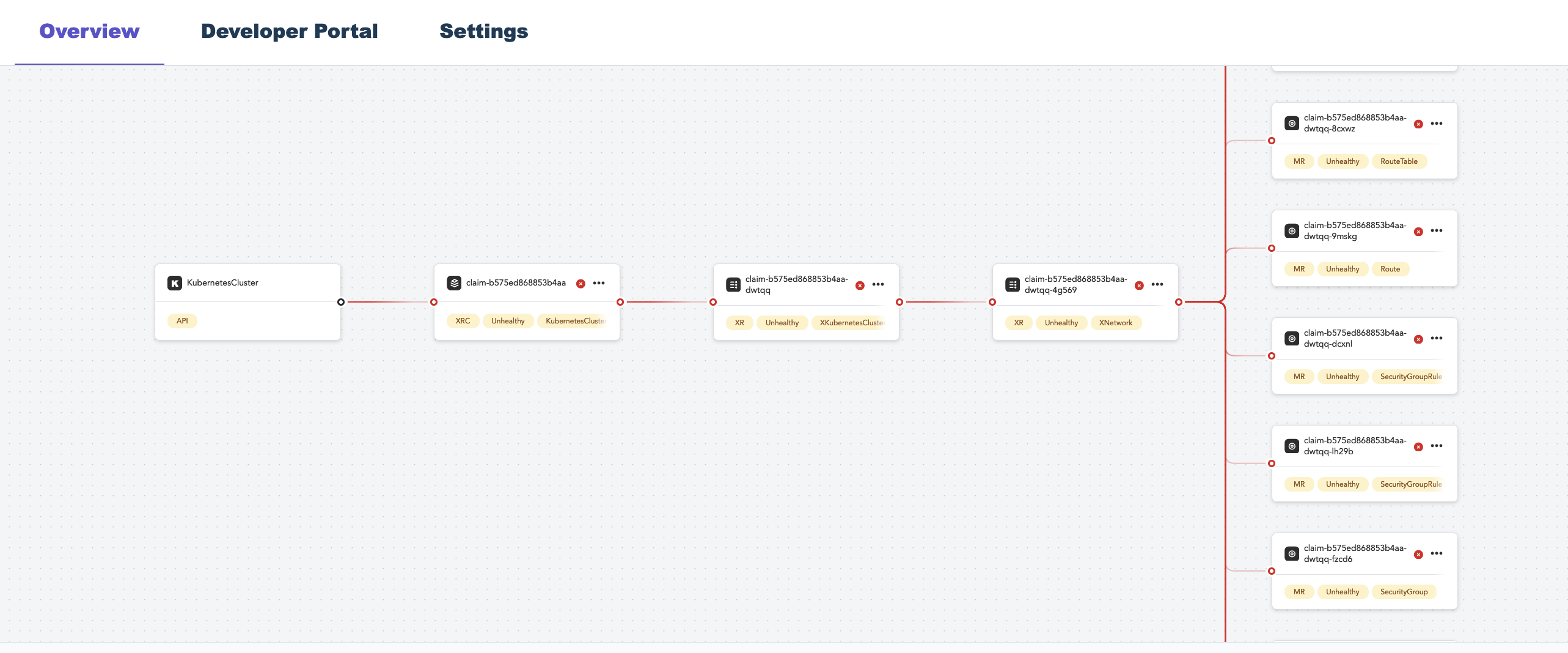
You can interact with the object through your cluster just as if it lives in your cluster.
Connect multiple app clusters to a control plane
Claims are store in a unique namespace in the Upbound control plane. Every cluster creates a new control plane namespace.
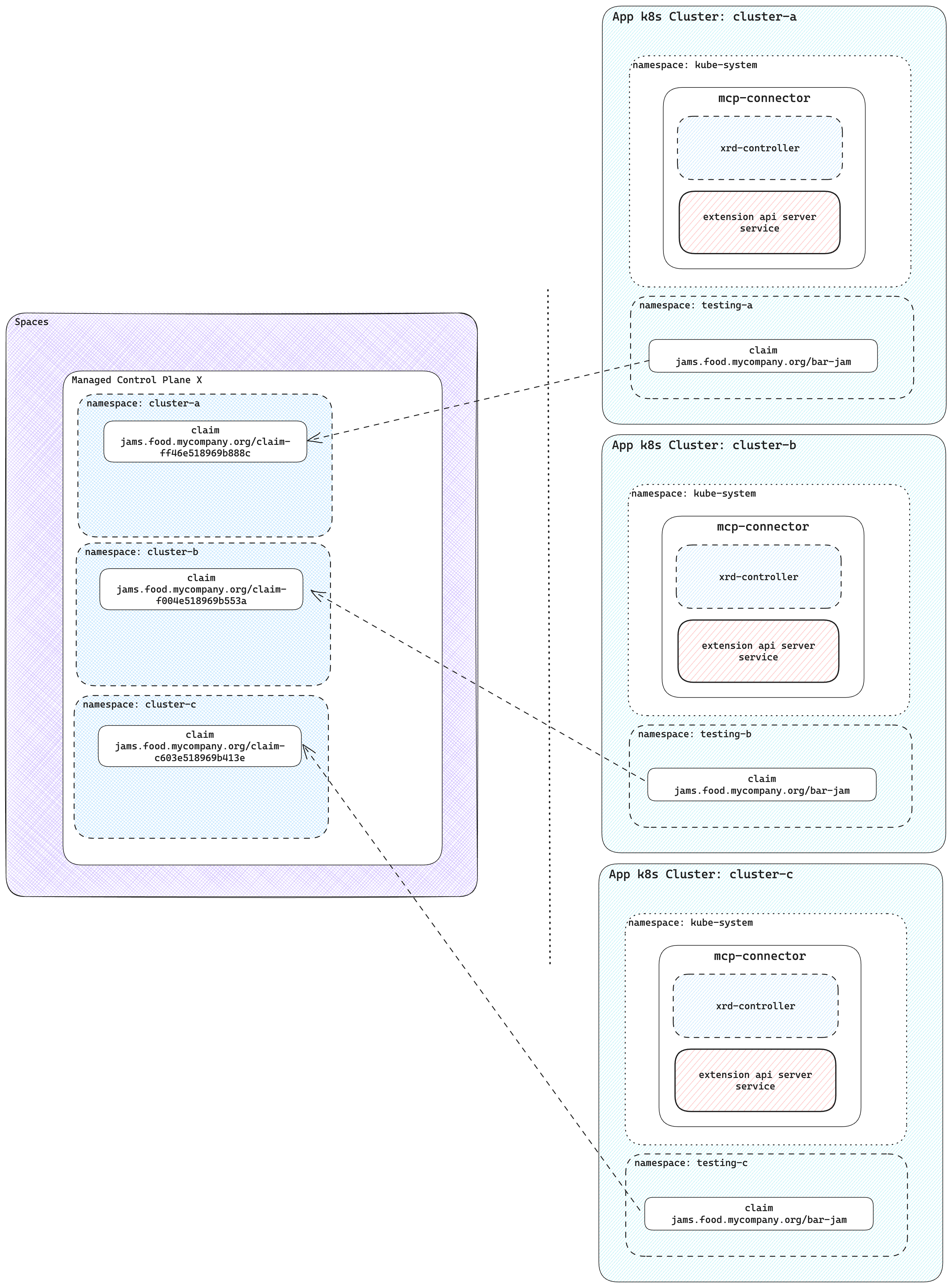
There's no limit on the number of clusters connected to a single control plane. Control plane operators can see all their infrastructure in a central control plane.
Without using control planes and Control Plane Connector, users have to install Crossplane and providers for cluster. Each cluster requires configuration for providers with necessary credentials. With a single control plane where multiple clusters connected through Upbound tokens, you don't need to give out any cloud credentials to the clusters.